Your profile is how the community sees you: on prompt cards, blog bylines, skill pages and challenge boards.
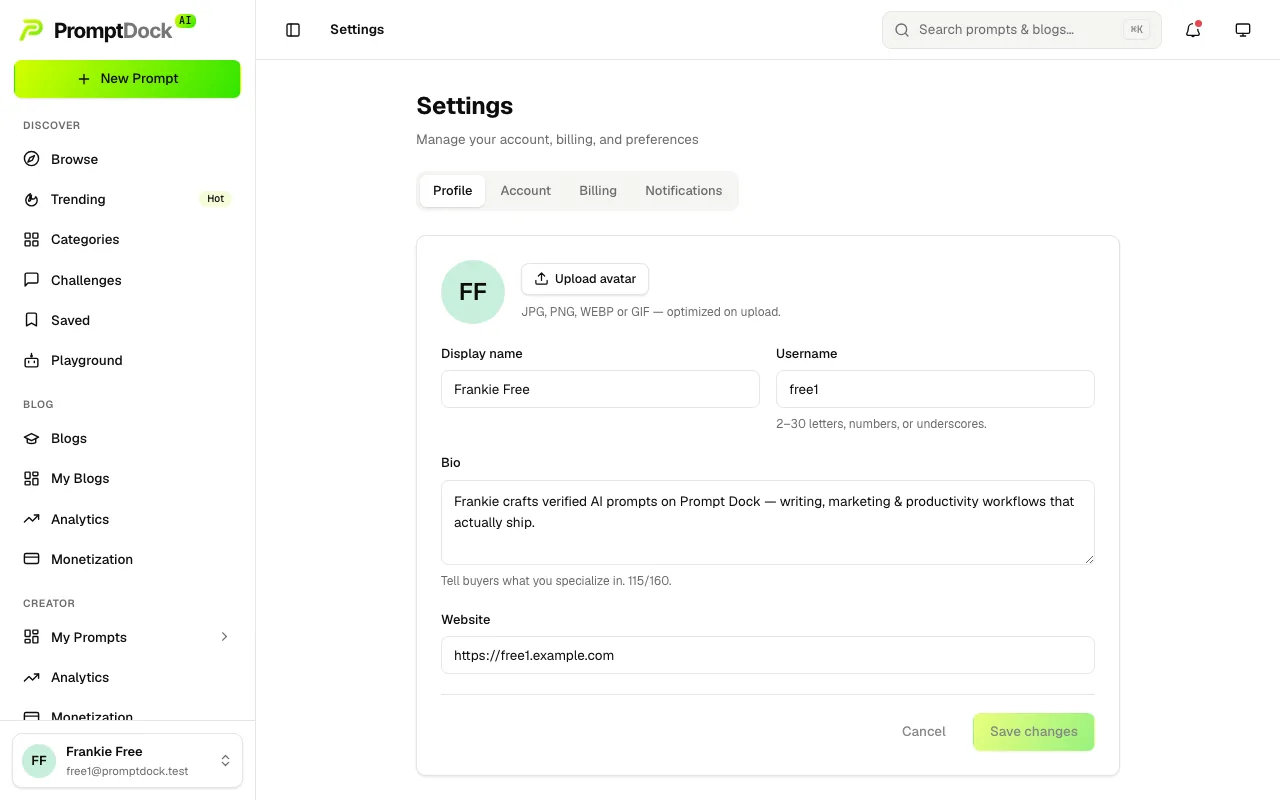
The basics
In Settings → Profile you can update:
- Display name and avatar. Pictures are downscaled and re-encoded before upload, so a large photo is fine.
- Username (handle). Every account is given one at signup; change it to something memorable. Usernames are letters, numbers and underscores, they are unique, and a short list of names such as "admin" and "support" is reserved. Availability is checked as you type.
- Bio and Website.

Your username is also your public address, so the field prints the exact URL underneath as you type.
The "Buy me a coffee" link
This one is not on the Profile tab. You set it in the blog compose sheet, and it saves to your profile rather than to that one post, so it shows on every post you publish where the support toggle is left on.
Interests
Pick up to 8 interest topics on the same tab. They seed the Recommended for you strips on Trending and Blogs, and keep counting alongside what you reveal, save and run.
Your public creator page
Publishing is what creates the page, not a plan. One published public prompt or one published blog post, and /u/your-username goes live with tabs for your prompts, skills and blogs. The sidebar profile menu's View public profile shortcut appears at the same moment.
The full story, including how to switch the page off, is in Your public creator profile.